%20or%20the%20dark%20window%20chrome.%20Any%20surface%20that%20needs%20it%20in%20another%20colour%20uses%20the%20file%20as%20a%20CSS%20mask%20and%20paints%20it%20with%20a%20token,%20rather%20than%20a%20second%20copy%20of%20the%20geometry%20in%20another%20colour.%20--%3e%3csvg%20viewBox='0%200%20512%20512'%20xmlns='http://www.w3.org/2000/svg'%20width='512'%20height='512'%3e%3cdefs%3e%3c!--%20The%20gaps%20in%20the%20rings:%20one%20column%20and%20one%20row,%20cut%20out%20of%20both.%20--%3e%3cmask%20id='mk-rings'%3e%3crect%20width='512'%20height='512'%20fill='%23fff'/%3e%3crect%20x='234'%20y='0'%20width='44'%20height='512'%20fill='%23000'/%3e%3crect%20x='0'%20y='234'%20width='512'%20height='44'%20fill='%23000'/%3e%3c/mask%3e%3c/defs%3e%3cg%20mask='url(%23mk-rings)'%20fill='none'%20stroke='%23ffffff'%20stroke-width='26'%3e%3crect%20x='96'%20y='96'%20width='320'%20height='320'%20rx='92'/%3e%3crect%20x='152'%20y='152'%20width='208'%20height='208'%20rx='62'/%3e%3c/g%3e%3ccircle%20cx='256'%20cy='256'%20r='70'%20fill='%23ffffff'/%3e%3c/svg%3e)
Your first query
This is the page where the product's central idea shows up. You write SQL, MongoDB runs a MongoDB command, and TableCore will show you exactly which command that was.
Write a SELECT
Select a collection in the explorer. A query tab opens against it, and the
editor accepts either an SQL SELECT or a MongoDB command — it works out which
one you typed.
SELECT * FROM users WHERE Age > 30 ORDER BY Name DESC LIMIT 10 OFFSET 5
The dialect is deliberately close to PostgreSQL's SELECT, with a few
inherited extensions: TOP, [bracketed identifiers] and OBJECTID(…). Both
spellings of paging work — LIMIT 10 OFFSET 5 and
OFFSET 5 ROWS FETCH NEXT 10 ROWS ONLY — and produce the same MongoDB command.
Run it
Run, or Ctrl+Enter. The results appear below the editor with the row count
beside them.
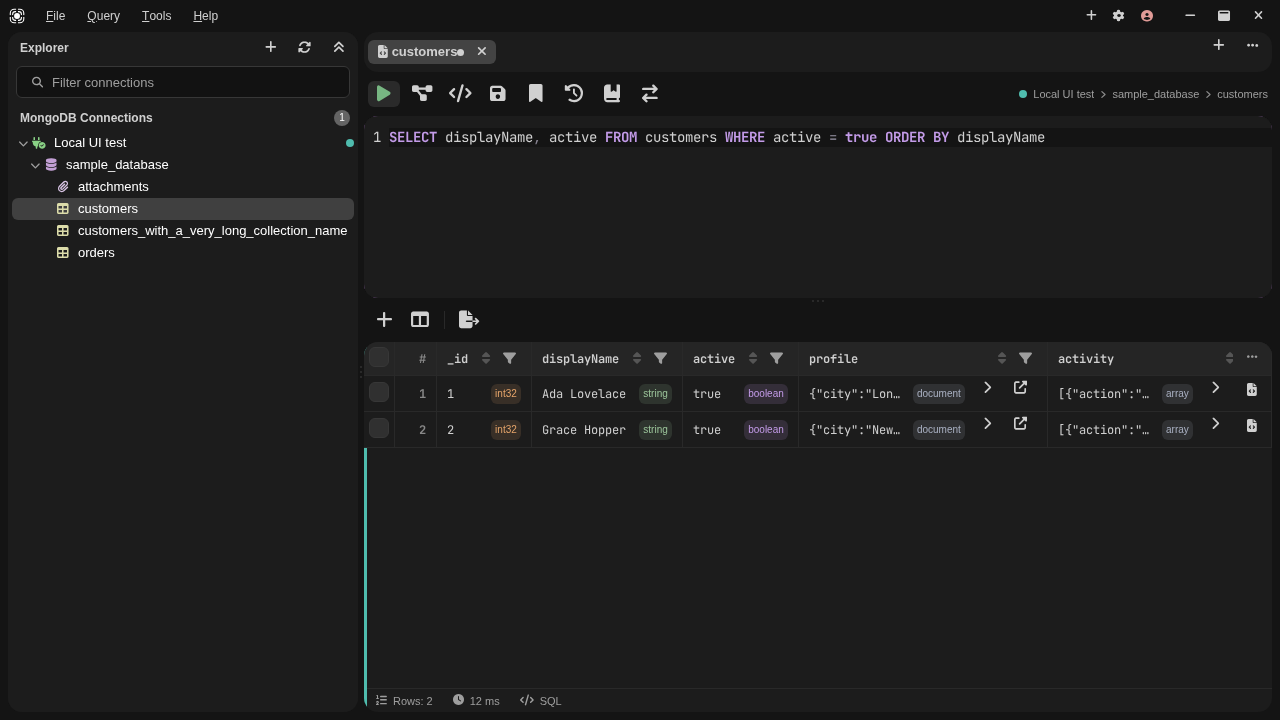
The grid is type-aware: it shows you the BSON type of each value rather than
flattening everything to text, because a string "42" and an Int32 42 are
different documents and a client that hides the difference will eventually cost
you an afternoon.
Results from a single collection that include _id are editable in place.
Results from a JOIN, a UNION, an aggregate, or any query that dropped _id
are read-only, and the grid says which of those it is rather than just refusing.
Now look at the MongoDB query
This is the part worth staying for. As code in the editor toolbar opens the
same query rendered for other tools — mongosh, the C# driver, and C# LINQ
where a lambda can express the query faithfully.
It is generated from the command TableCore would send, not from a second translation written for display. What you read is what runs.
For the SQL above, the command is:
{
  "find": "users",
  "filter": { "Age": { "$gt": 30 } },
  "sort": { "Name": -1 },
  "skip": 5,
  "limit": 10
}
WHERE became filter. ORDER BY … DESC became sort with -1. OFFSET
and LIMIT became skip and limit. Nothing was reinterpreted on the way.
Convert the tab to MongoDB and keep working
Convert to a MongoDB query goes one step further: it replaces the SQL in your editor with the shell chain a MongoDB user would have typed, and leaves it there to edit and run.
db.customers.aggregate([
  {
    "$match" : {
      "active" : true
    }
  },
  {
    "$group" : {
      "_id" : "$country",
      "total" : { "$sum" : 1 }
    }
  }
])
Back to SQL restores the exact text you started from — character for
character, from memory, not by translating backwards. There is no faithful
MongoDB → SQL direction: one filter document answers to many SQL statements, and
$elemMatch, $expr and $regex with options have no form in this dialect. A
backward translator could only guess, and guessing quietly is the one thing the
query paths never do.
A conversion that cannot be complete does not happen at all
A query that runs as several commands — a set operation, or a subquery read while the plan is being built — is refused by name instead of converted. Half a pipeline in your editor is the worst outcome available, because it looks like it worked.
The command that produced the rows you are looking at
Everything above is asked of the editor: As code, Convert and Explain all plan the text currently in it. Command behind these rows, above the result grid, answers a different question — what TableCore actually sent for the result on screen.
The difference matters as soon as the two can disagree. Edit the SQL after a run and a fresh translation describes the query you have not run yet. The collection's field-name casing and value coercion are resolved from a live sample, so the same SQL planned an hour later need not produce the same command either. The panel therefore shows nothing but what the run itself recorded: it costs no extra query, a new run replaces it, each tab keeps its own, and closing the tab drops it.
An aggregation is listed stage by stage, and a note about the answer is shown
against the stage that produced it — a GROUP BY that had to pick a row
arbitrarily is marked on the $group stage rather than left for you to find.
The copy button gives you the whole command in mongosh form, the same text the
As code dialog offers.
Where there is no single command, it says so
A query that runs as several commands — a set operation, a subquery read while the query is still being built — has no one command that produced the rows, and a raw command document never had one recorded because it already is the command. The panel says that plainly. It does not quietly plan the query again to have something to show, because a plan made now describes what would be sent now.
When you want to know why it is slow
Explain asks the server for the plan of the current query and shows the stages, the number of documents examined for every row returned, and whether an index was used at all. Nothing is returned to the grid — the query is planned and measured, not fetched.
That is usually the moment you discover the query needs an index. Both halves have their own pages: Explain plans and Indexes.
Next
- What this release covers — including why
INSERT,UPDATEandDELETEare refused. - SQL support — the clause-by-clause reference, and the measured agreement with SQL on three public corpora.
- Or try the same translation without installing anything, in the browser: the SQL to MongoDB converter.