%20or%20the%20dark%20window%20chrome.%20Any%20surface%20that%20needs%20it%20in%20another%20colour%20uses%20the%20file%20as%20a%20CSS%20mask%20and%20paints%20it%20with%20a%20token,%20rather%20than%20a%20second%20copy%20of%20the%20geometry%20in%20another%20colour.%20--%3e%3csvg%20viewBox='0%200%20512%20512'%20xmlns='http://www.w3.org/2000/svg'%20width='512'%20height='512'%3e%3cdefs%3e%3c!--%20The%20gaps%20in%20the%20rings:%20one%20column%20and%20one%20row,%20cut%20out%20of%20both.%20--%3e%3cmask%20id='mk-rings'%3e%3crect%20width='512'%20height='512'%20fill='%23fff'/%3e%3crect%20x='234'%20y='0'%20width='44'%20height='512'%20fill='%23000'/%3e%3crect%20x='0'%20y='234'%20width='512'%20height='44'%20fill='%23000'/%3e%3c/mask%3e%3c/defs%3e%3cg%20mask='url(%23mk-rings)'%20fill='none'%20stroke='%23ffffff'%20stroke-width='26'%3e%3crect%20x='96'%20y='96'%20width='320'%20height='320'%20rx='92'/%3e%3crect%20x='152'%20y='152'%20width='208'%20height='208'%20rx='62'/%3e%3c/g%3e%3ccircle%20cx='256'%20cy='256'%20r='70'%20fill='%23ffffff'/%3e%3c/svg%3e)
Indexes
This is the page that pays for Explain plans. Explain tells you the query read the whole collection; this is where you do something about it.
Open the index dialog from a collection's context menu.
What the list shows
For every index: its keys, its options, its size on disk, and how many times the server chose it and since when it has been counting.
An index nobody uses costs writes and disk space for nothing, and from a driver you cannot easily check.
The count and the start date travel together
Usage counters reset when the server restarts. A number without the date it counts from is not a fact about the index, it is a fact about uptime wearing a fact about the index's face. A window shorter than seven days is called out explicitly: a zero there means not used recently, not not used.
Reading usage statistics needs permissions the connected user may not have. When they are missing, the dialog names the reason — not permitted, not supported, or unavailable — rather than showing an empty table. An empty table implying zero usage is the worst possible failure for this feature; it is how you drop the index a nightly job depends on.
The index list itself comes from ordinary listing rather than from the statistics command, so you always see which indexes exist even when no statistic can be read. "No number" and "zero" are different values and the interface distinguishes them.
After you create or drop an index the statistics are read again: a new index has served nothing yet, and a dropped one costs nothing now.
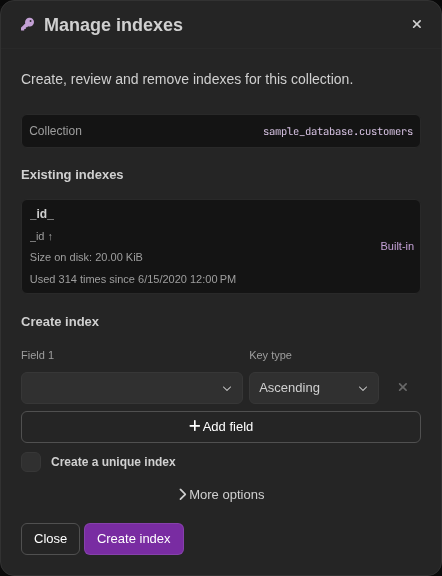
Creating an index
TableCore builds the createIndexes entry itself rather than using the driver's
helper, which does not express every option. The command carries an explicit
name — the same one the server would have generated if you do not supply your
own — and that name is what makes cancelling possible.
Combinations the server would only reject after building the whole index are rejected before the command is sent:
- a TTL index needs exactly one ordered field,
uniqueis not available for hashed or wildcard keys,sparsedoes not combine withpartialFilterExpression,wildcardProjectionrequires a$**key,collationmust name alocale.
partialFilterExpression, collation and wildcardProjection are kept as
text until they are checked, so the dialog can show you where the error
is. The driver's parser says what it expected and never says where, so TableCore
locates the position separately. That probe runs only after the real parser has
already rejected the text and never rejects anything itself — a shape it does
not understand (extended JSON, ISODate(…), unquoted names) costs you the
position, not a false error.
Cancelling a build
Cancelling is not giving up on waiting. The cancellation token stops the client waiting; the server keeps building. So TableCore also drops the index by name — that is how you interrupt a build in MongoDB.
The drop is best-effort: the build may have finished already, or not started.
Editing an index
MongoDB has no command that modifies an index. Editing is a drop followed by a create, so TableCore remembers the original specification and tries to restore it when the second half fails.
The result names what actually happened:
| Outcome | Meaning |
|---|---|
| Replaced | The new index exists |
| Create failed, original restored | You are back where you started |
| Create failed, original lost | The collection has neither |
The third one is a production incident, not an interface hiccup, and it is
reported as such. Restoration drops the fields createIndexes will not accept
(v, ns, clustered).
Text indexes look different when they come back
MongoDB replaces a text index's keys with an _fts/_ftsx pair and moves the
fields into weights. TableCore reads the field names back out of weights, so
the list shows you the index you created rather than the one the server stores.
A practical order of work
- Run the query. It is slow.
- Explain it. Read documents examined for every row returned.
- Index the field being filtered, sorted or joined on.
- Explain again. The ratio should collapse.
- Come back in a week and check the usage counter, so the index you added is the index being used.
For a $lookup, index the foreign field. An unindexed $lookup reads the
foreign collection once per input document and does not appear as a collection
scan in the outer plan — TableCore's explain detects it anyway, which is often
the first time anyone sees it.